




G
Volt 476P
I’ve been using this interface for only a couple months, but I’m so happy with the results so here’s my review. I used a UR242 for years & never had a problem with it for what I do. The dsp’s weren’t terrible, but it was nice to have them for latency issues. Only thing lacking was an insufficient number of outs, which is what I was looking for to reamp guitars. I was looking at the Tascam 208i, but then happened to see an ad for the new budget-line interfaces from UA. Normally, I would never be able to afford anything from UA, but I was intrigued by the built-in compressors & vintage preamps at a budget price.
Since then, my recordings have taken on another life. The preamps are crystal clear, 1176 compressors sound great on both vocals and instruments, and the monitoring choices are a game changer when mixing. I love that there’s also a MONO button, as I always check my mixes in MONO. I don’t use the preamps & compressors on every track, but they’re nice to have nonetheless. I’ve also tried reamping my guitars through the 1176 and the vintage preamp for a more rich tone without having to use multiple plugins. Very happy with the results.
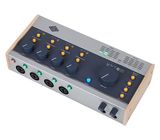
Pros: portable, well-built with classy wood panels reminiscent of Moog pedals, 2 headphone inputs for independent monitoring, Mono button for mixing, multiple monitoring capabilities and a good amount of quality software. Budget price.
Cons: no internal dsp, like in the Apollo models. This isn’t such a big issue for me, as the included software bundle makes up for the lack of dsp.
Overall, I’m elated with this purchase and plan to write another review in a few months. I’m running an old 2011 MBP with a Mojave patch, so make sure your computer is compatible with Mojave or later if you’re running Mac OS. Flawless service from Thomann as usual.
Since then, my recordings have taken on another life. The preamps are crystal clear, 1176 compressors sound great on both vocals and instruments, and the monitoring choices are a game changer when mixing. I love that there’s also a MONO button, as I always check my mixes in MONO. I don’t use the preamps & compressors on every track, but they’re nice to have nonetheless. I’ve also tried reamping my guitars through the 1176 and the vintage preamp for a more rich tone without having to use multiple plugins. Very happy with the results.
Pros: portable, well-built with classy wood panels reminiscent of Moog pedals, 2 headphone inputs for independent monitoring, Mono button for mixing, multiple monitoring capabilities and a good amount of quality software. Budget price.
Cons: no internal dsp, like in the Apollo models. This isn’t such a big issue for me, as the included software bundle makes up for the lack of dsp.
Overall, I’m elated with this purchase and plan to write another review in a few months. I’m running an old 2011 MBP with a Mojave patch, so make sure your computer is compatible with Mojave or later if you’re running Mac OS. Flawless service from Thomann as usual.
11
0
Jelentem!
D
Reliable, many inputs, real knobs and buttons
I chose this interface to replace my Focusrite Scarlett 4i4 (3rd Gen) a bit more than a month ago, and it is indeed the better product!
I had the Scarlett for many years, and a Solo before, as my recording and playback interfaces, and I routed my regular audio through it as well. The Scarletts had driver/firmware problems early on, then improved, then got less reliable late in the Windows 10 life cycle, and shortly after the migration to Windows 11 the 4i4 became practically unusable. I tried every optimization guide, clean-up, driver updates, latency analysis. I fixed the worst problems, but the interface did audible pops and clicks even at latencies of 40 ms / buffer size 512 (in "safe mode!"). My regular Windows audio that also used the Focusrite USB driver became garbled at times, would short out until I switched the driver settings. It was bad. And frankly, latency was never truly good with the Focusrite!
Not only are the issues gone after getting the Volt, it has proven rock stable and improved latency. Buffer size 128 is okay, 256 is absolutely stable without any observed issue. Even if that's only because of a better driver, that's good enough for me - because Focusrite messed this up several times over the years. It doesn't matter what an audio interface can do if you can't use it in its most basic use cases!
The next thing that's great about the Volt is that it has 4 instrument high impedance capable inputs. Since I record multiple guitars and basses, or play with friends, this can be a god-send! Even better - two monitor outs that you can dial in separately, so if I play with a friend, we can both do our own monitoring with headphones. These inputs can also handle balanced/mic inputs and provide shadow voltage. The Hi-Z behavior can be toggled - each with its own button.
Speaking of buttons. Everything the Volt can do is controlled by a hardware knob or button, everything is shown by a light. In the Focusrite Scarlett, most stuff had to be done in a software called Focusrite Control. The Volt can be completely run by buttons and apparently can be even run as a standalone. (I guess as a simple 4 track mixing desk?) It has a separate power input but can also be powered by USB. USB power also works well and is controlled by the same switch.
The only settings unavailable through the buttons are then sample rate, buffer size and, again, "safe mode." That's it. This is also the driver part your DAW will allow you to access.
I found that direct-in recording on the Volt for my bass sounds great, don't ask me what's the true difference here. I like adding the color and compressor settings as well for this scenario. They're surprisingly good given that they are mere buttons with only three configuration options for the compressor.
But even if leaving the preamp at minimum and adding none of the "special sauce" my guitar signals are just fine to work with in amp sims.
When it comes to managing input and output routings, the Volt has the ability to route inputs for direct monitoring, either in mono or stereo, and it has the ability to do output routing in a similar fashion, and a weird mixed mode that slightly reduces output volume and puts direct inputs on top. The manual is not very clear (or verbose) on how all of this works. I would have actually reduced a star in features for this because other interfaces handle this much more diversely in software, but if you use driver outputs 3 and 4 for cueing from your DAW and just switch with the existing buttons, you have everything you need for flexible monitoring without having to mess with a driver.
So, given this, the Volt is a great all-rounder with solid quality and not reliant on the driver to do its magic.
I had the Scarlett for many years, and a Solo before, as my recording and playback interfaces, and I routed my regular audio through it as well. The Scarletts had driver/firmware problems early on, then improved, then got less reliable late in the Windows 10 life cycle, and shortly after the migration to Windows 11 the 4i4 became practically unusable. I tried every optimization guide, clean-up, driver updates, latency analysis. I fixed the worst problems, but the interface did audible pops and clicks even at latencies of 40 ms / buffer size 512 (in "safe mode!"). My regular Windows audio that also used the Focusrite USB driver became garbled at times, would short out until I switched the driver settings. It was bad. And frankly, latency was never truly good with the Focusrite!
Not only are the issues gone after getting the Volt, it has proven rock stable and improved latency. Buffer size 128 is okay, 256 is absolutely stable without any observed issue. Even if that's only because of a better driver, that's good enough for me - because Focusrite messed this up several times over the years. It doesn't matter what an audio interface can do if you can't use it in its most basic use cases!
The next thing that's great about the Volt is that it has 4 instrument high impedance capable inputs. Since I record multiple guitars and basses, or play with friends, this can be a god-send! Even better - two monitor outs that you can dial in separately, so if I play with a friend, we can both do our own monitoring with headphones. These inputs can also handle balanced/mic inputs and provide shadow voltage. The Hi-Z behavior can be toggled - each with its own button.
Speaking of buttons. Everything the Volt can do is controlled by a hardware knob or button, everything is shown by a light. In the Focusrite Scarlett, most stuff had to be done in a software called Focusrite Control. The Volt can be completely run by buttons and apparently can be even run as a standalone. (I guess as a simple 4 track mixing desk?) It has a separate power input but can also be powered by USB. USB power also works well and is controlled by the same switch.
The only settings unavailable through the buttons are then sample rate, buffer size and, again, "safe mode." That's it. This is also the driver part your DAW will allow you to access.
I found that direct-in recording on the Volt for my bass sounds great, don't ask me what's the true difference here. I like adding the color and compressor settings as well for this scenario. They're surprisingly good given that they are mere buttons with only three configuration options for the compressor.
But even if leaving the preamp at minimum and adding none of the "special sauce" my guitar signals are just fine to work with in amp sims.
When it comes to managing input and output routings, the Volt has the ability to route inputs for direct monitoring, either in mono or stereo, and it has the ability to do output routing in a similar fashion, and a weird mixed mode that slightly reduces output volume and puts direct inputs on top. The manual is not very clear (or verbose) on how all of this works. I would have actually reduced a star in features for this because other interfaces handle this much more diversely in software, but if you use driver outputs 3 and 4 for cueing from your DAW and just switch with the existing buttons, you have everything you need for flexible monitoring without having to mess with a driver.
So, given this, the Volt is a great all-rounder with solid quality and not reliant on the driver to do its magic.
2
0
Jelentem!
PT
Well-rounded Interface
A solid audio interface with plenty to like:
1. Great pre-amps on all channels - vocals sound clean and uncoloured, electric guitar/bass sound rich even through DI.
2. Intuitive hardware design - IO are easy to access, layout of buttons and knobs are good, meters are clear.
What could be better:
Shared phantom power button - having 1 button shared across all channels could potentially damage your mics if not mindful.
Reasons to go for a different option:
Lack of expandability - doesn't have spdif for additional inputs. If you want spdif expandability, go for the Audient ID44 MKii, which is its direct competitor.
Why you should get the Volt 476p:
Sounds good, looks good and comes with a number of great plugins. Along with the Audient ID44, this is probably the best bang for the buck mid-range interface.
1. Great pre-amps on all channels - vocals sound clean and uncoloured, electric guitar/bass sound rich even through DI.
2. Intuitive hardware design - IO are easy to access, layout of buttons and knobs are good, meters are clear.
What could be better:
Shared phantom power button - having 1 button shared across all channels could potentially damage your mics if not mindful.
Reasons to go for a different option:
Lack of expandability - doesn't have spdif for additional inputs. If you want spdif expandability, go for the Audient ID44 MKii, which is its direct competitor.
Why you should get the Volt 476p:
Sounds good, looks good and comes with a number of great plugins. Along with the Audient ID44, this is probably the best bang for the buck mid-range interface.
11
1
Jelentem!
HP
A Joy To Use
I researched several audio interfaces at different price points, concluding that for my needs and at this price point, the Volt 476P was the very best choice.
The inputs/outputs are sufficient for my use with a synthesizer and MPC, both in stereo. The build quality of the interface appears to be excellent, as is the unit's aesthetics. The dials and buttons all feel great.
The highlights of this interface are also its quick set-up time, ease of use and for my personal use requirement; monitoring of audio is easily the best I could find.
The included software is very good. As for the on-board (hardware) effects, I like it them a lot, even if they are not highly customizable. I have not tried the included Luna DAW software, but I definitely plan to when required.
I wish I could have purchased this interface at the current price, but I am still highly satisfied. Overall, simply a joy to use.
The inputs/outputs are sufficient for my use with a synthesizer and MPC, both in stereo. The build quality of the interface appears to be excellent, as is the unit's aesthetics. The dials and buttons all feel great.
The highlights of this interface are also its quick set-up time, ease of use and for my personal use requirement; monitoring of audio is easily the best I could find.
The included software is very good. As for the on-board (hardware) effects, I like it them a lot, even if they are not highly customizable. I have not tried the included Luna DAW software, but I definitely plan to when required.
I wish I could have purchased this interface at the current price, but I am still highly satisfied. Overall, simply a joy to use.
9
0
Jelentem!
KA
For this price range this is one of the BEST!
I bought this as a backup to my apollo twin mkii for my mobile station paired with a macbook pro, I've tried to record & mix with this interface and it sounds good, for tracking I prefer not to use the vintage pre so I can edit further or reprint using my neve 1073dpa, IMO overall this machine is looks great & sounds very decent
3
0
Jelentem!
R
All good - a software interface would have been better
Many functionalities and connectivities, Sounds great. Two headphoe outs are really handy. Only thing is its not very much intuitive about monitoring. And often monitor levels are low. A software interface would have been great!
0
0
Jelentem!
D
Ce une carte sound uniquement incroyable
Moi je suis très content avec ça carte sound tu peux avoir une sound professionnel avec ton home studio 5 étoiles
0
0
Jelentem!
C
Best sound - no USB artefacts
I have looked for the perfect USB interface that did not have artefacts, HDD noise over the USB connection. Without giving names - 476P was the one that did not have these issues, and i have tried so many before this one.
On board compression is excellent and i have recorded the best vocals in years with it! Well done, Recommended.
On board compression is excellent and i have recorded the best vocals in years with it! Well done, Recommended.
0
0
Jelentem!
RS
Best bellow 500 euros áudio interface in the market
The market is flooded with áudio interfaces. This is the best one under 500 euros with 4 xlr channels to show for. I have zero complaints so far
0
0
Jelentem!